It's a good idea to create a second account in Ubuntu (or even if you're using any other Linux distribution). It's no secret that Linux is very customizable and the urge to play with it once you're set up is very strong. A second account configured minimally, is a good way to back up your settings, also it serves as a life boat if your command module gets stranded.
You can create an account by running User Accounts.
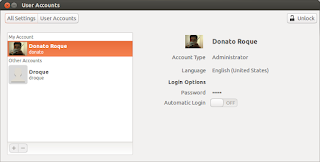
User Accounts under System Settings
Or just open a terminal type:
$adduser "username"
Go with the defaults. Enter a password once prompted. Information regarding user will be saved in /etc/adduser.conf.
Now you can modify or theme your main account all you want.
You can create an account by running User Accounts.
User Accounts under System Settings
Or just open a terminal type:
$adduser "username"
Go with the defaults. Enter a password once prompted. Information regarding user will be saved in /etc/adduser.conf.
Now you can modify or theme your main account all you want.
Comments