I have a new desktop computer. It's an Intel i5-4590 Quad Core, Asus Z97-K motherboard Personal Computer. I installed a 16 GB (2x8 Kingston HyperX sticks) RAM. I chose the Crucial 240 GB SSD for storage. Additionally, I purchased a 2 TB Seagate SATA 6 hard drive for media. The casing is black and lighter than the old one I have back in 2008. The casing is paired with a 730 watt power supply.
I recycled the dvd player and card reader from my old rig.
I thought the old 1 TB Seagate hard drive is finished but after reformatting, it passed the test. It's still okay.
I installed fedora 20 on the boot device. I'm updating the system now.
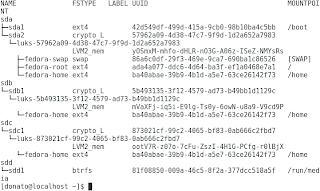
output of the lsblk -f command for this computer.
I decided to encrypt the whole device after opting for an LVM.

I'm using the Linux kernel 3.16.6 coming from the updates channel in fedora 20.
I recycled the dvd player and card reader from my old rig.
I thought the old 1 TB Seagate hard drive is finished but after reformatting, it passed the test. It's still okay.
I installed fedora 20 on the boot device. I'm updating the system now.

output of the lsblk -f command for this computer.
I decided to encrypt the whole device after opting for an LVM.

I'm using the Linux kernel 3.16.6 coming from the updates channel in fedora 20.
Comments